Showing posts with label Windows 10.how to. Show all posts

5/20/17

Install Ubuntu 17.04 on Windows 10/Oracle VirtualBox


This video show how to install Install Ubuntu 17.04 on Windows 10 with Oracle VirtualBox 5.1. Basically, the steps is very straightforward.


But...after setup, I cannot google in the browser. And it was found some sites can be reached, some sites cannot. Even cannot run apt-get update. After some searching, I found it's related to DNSSEC in /etc/systemd/resolved.conf.

To fix it, edit the file /etc/systemd/resolved.conf:
$ sudo nano /etc/systemd/resolved.conf

uncomment #DNSSEC=allow-downgrade and replace allow-downgrade with off .


Save and Exit
Reboot

This video show how:


reference:
This page have a good explanation: Hectic Geek - Websites Not Loading (dns issue) After Installing Ubuntu 17.04? [fix]

Install Guest Addition:
The Guest Additions are designed to be installed inside a virtual machine after the guest operating system has been installed. They consist of device drivers and system applications that optimize the guest operating system for better performance and usability. (https://www.virtualbox.org/manual/ch04.html)

It's strongly recommended to install Guest Addition. In case of Ubuntu 17.04, simple click Devices on VirtualBox menu bar, and click Insert Guest Addition CD image...


Share folder between host Windows 10 and guest Ubuntu 17.04:
Starting with version 4.0, VirtualBox can mount shared folders automatically, at your option (link). This video show how to set auto-mount share folder in host Windows 10, and also add user to vboxsf group in guest Ubuntu to access the share folder. (Guest Addition is need)


Read More
Advertisement

5/14/17

Paint 3D: a new app in Windows 10 Creators Update

Paint 3D is a new FREE app in Windows 10 Creators Update to paint in 3D.

Read More
Advertisement

5/13/17

How to disable "SMB 1.0/CIFS File Sharing Support" in Windows 10


Open Control Panel
- Program

- Programs and Features > Turn Windows features on or off

- Uncheck "SMB 1.0/CIFS File Sharing Support"

- And restart your computer


Reference:
~ Microsoft Support: How to enable and disable SMBv1, SMBv2, and SMBv3 in Windows and Windows Server

Read More
Advertisement

8/3/16

Windows 10 Anniversary Update

Windows 10 Anniversary Update will begin rolling out around the world. The Windows 10 Anniversary Update is full of new features and innovations that bring Windows Ink and Cortana to life; a faster, more accessible and more power-efficient Microsoft Edge browser; advanced security features; new gaming experiences and more. The Windows 10 Anniversary Update will start rolling out to Windows 10 Mobile phones in the coming weeks.

The Windows 10 Anniversary Update is being rolled out to Windows 10 PCs across the world in phases starting with the newer machines first. You don’t have to do anything to get the Windows 10 Anniversary Update, it will roll out automatically to you through Windows Update if you’ve chosen to have updates installed automatically on your device. However, if you don’t want to wait for the update to roll out to you, you can manually get the update yourself on your personal PC. If you’re using a Windows 10 PC at work, you will need to check with your IT administrator for details on your organization’s specific plans to update.

Read more at https://blogs.windows.com/windowsexperience/2016/08/02/how-to-get-the-windows-10-anniversary-update/#ZMI61X8Smr8eLb88.99


Read More
Advertisement

6/23/16

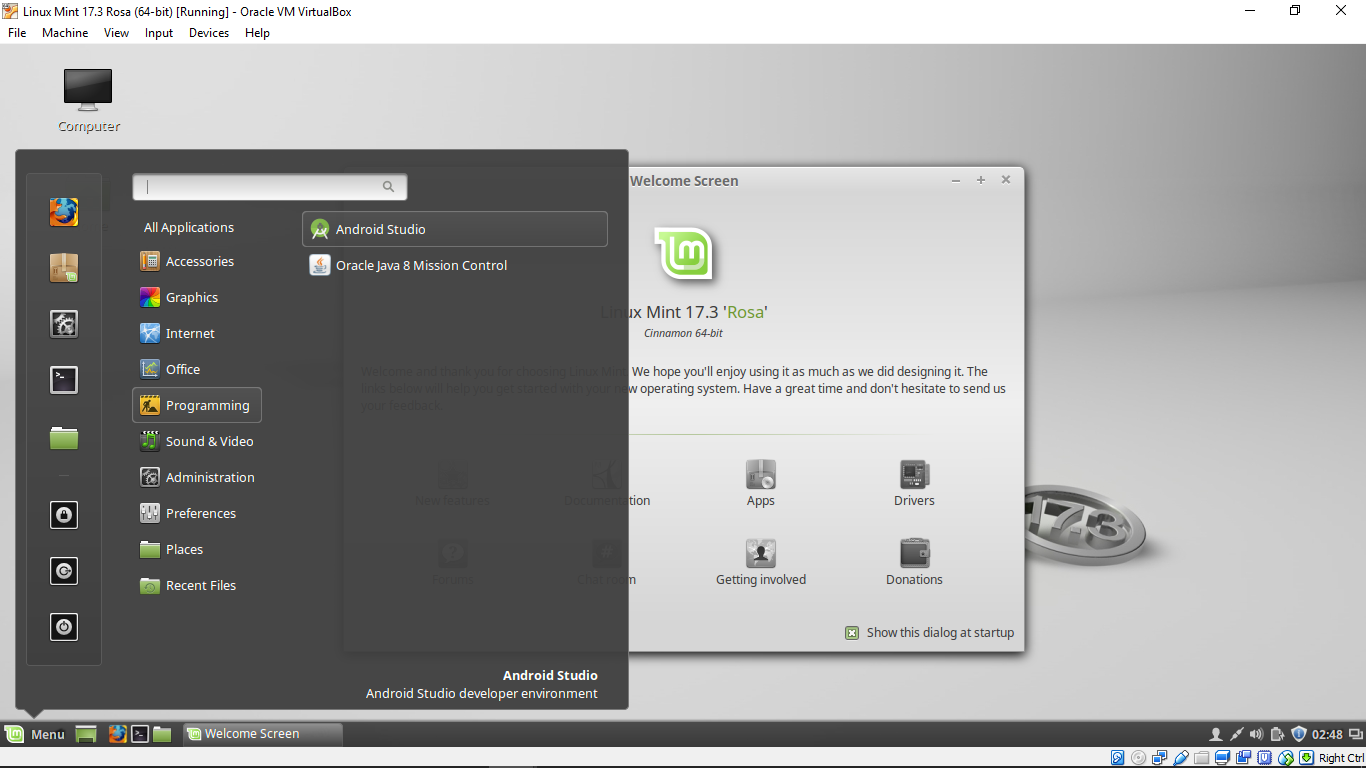
Install Android Studio 2.1.2 on Linux Mint 17.3 Rosa


This video show how to install Android Studio (currently 2.1.2) on Linux Mint 17.3 Rosa run on VirtualBox/Windows 10.

Before install Android Studio, have to install jdk. Refer to Install Oracle Java8 on Linux Mint 17.3 Rosa.


Enter in Terminal:
$ sudo add-apt-repository ppa:ubuntu-desktop/ubuntu-make
$ sudo apt update
$ sudo apt install ubuntu-make
$ umake android

After reboot, launcher icon of Android Studio will appear in Linux Mint Menu.


Read More
Advertisement

Install Linux Mint 17.3 Rosa on VirtualBox/Windows 10


This video show how to install Install Linux Mint 17.3 Rosa on Oracle VirtualBox/Windows 10.

Download Linux Mint iso file from https://www.linuxmint.com/.


The video also show how to enable 3D Acceleration in VirtualBox. (Please note: In my experience of using Ubuntu on VirtualBox/Windows 10, sometimes will have problem when 3D Acceleration enabled.)


Read More
Advertisement